
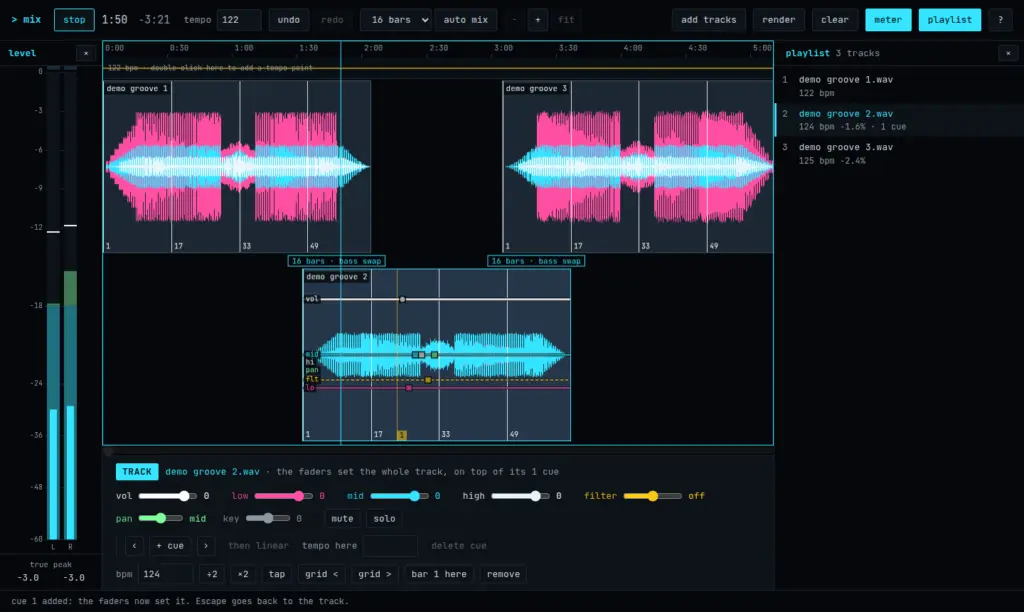
Mix your tracks into one continuous set on a timeline, in your browser. Tempo and beats are found for you, transitions are beat-matched, and you shape each one with cues for volume, EQ, filter and pan. When it sounds right, render the whole mix to a WAV file. Your tracks are never uploaded.
What it does
- Add tracks in any format your browser can play: MP3, AAC and M4A, FLAC, WAV, Ogg and Opus. Each one’s tempo and beats are detected. If a guess is off, type the tempo, tap it, halve or double it, or nudge the beat grid.
- Auto mix lays them out one after the other, overlapping by 8, 16 or 32 bars. Drag a track to move it (it snaps to the bars of the track it meets), and drag its edges to trim it.
- Transitions: a bass swap, a blend, a cut, or nothing but your own cues.
- One tempo line for the whole mix. Every track follows it, so the beats stay locked through a transition, even while the tempo changes.
- Cues on a track set its volume, low, mid and high EQ, filter, pan and key at that point, and glide to the next cue: straight, smooth, or holding until it.
- A level meter with peak, RMS and true peak, and a playlist that jumps to a track’s start. Hide either one to give the tracks more room.
- Render the finished mix to a 16-bit, 44.1 kHz WAV file.
- Undo and redo, and keyboard shortcuts for almost everything. Press ? in the editor for the list.
Your tracks stay on this device
Everything happens in your browser. Tracks are decoded and kept in your browser’s own storage for this site, together with the mix, so the editor opens where you left it. Nothing is sent anywhere. clear in the editor removes it all. A minute of audio takes about 10 MB.
What you need
A computer with a keyboard and mouse, and Chrome, Edge, Brave or Firefox. Safari has not been tested yet. The editor uses the whole window, and runs in one tab at a time.